> ## Documentation Index
> Fetch the complete documentation index at: https://docs.trybloom.ai/llms.txt
> Use this file to discover all available pages before exploring further.
# Build an on-brand web page
> Use Bloom's brand guidance and assets to build a responsive, client-facing web page in your existing web stack.
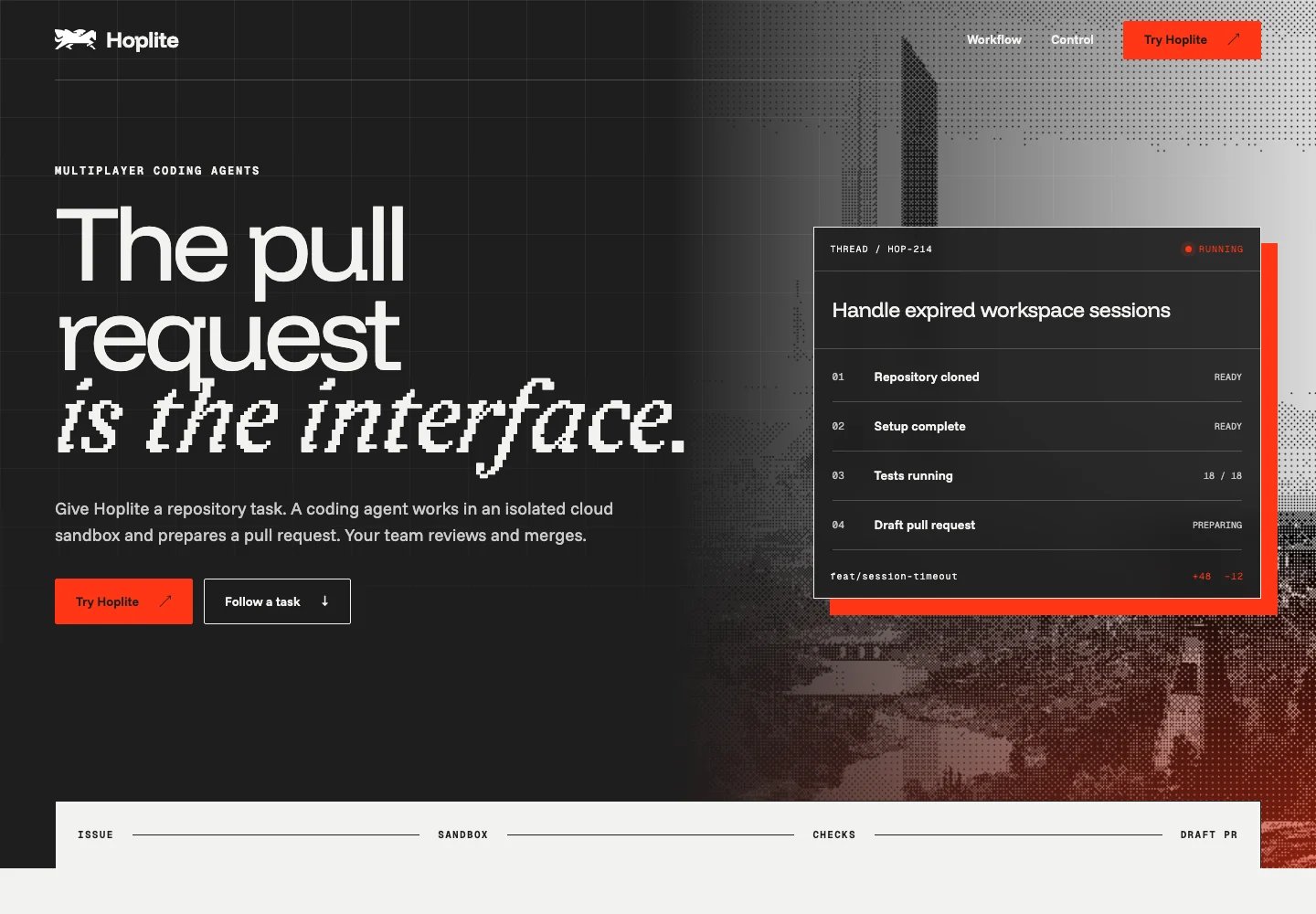 Inspect the complete Hoplite concept page.
Bloom supplied task-specific guidance and 19 relevant assets for this Hoplite feature page. The phrase “The Pull Request is the Interface” and the supported product flow shaped the story, while typography, palette, and gradient rules guided the design. Selected product UI and architectural imagery grounded the page in Hoplite's existing identity.
Use the same workflow for your own website, client pages, or a product serving multiple brands.
## What you need
* A development environment connected to Bloom through MCP.
* A ready brand in Bloom, or sources to [create one](/guides/create-brand).
* Access to [Bloom briefs](/guides/request-brief), currently in private beta for selected accounts. Request access at [support@trybloom.ai](mailto:support@trybloom.ai).
This example used Next.js and React. Use the web stack already in your project.
## Run it with your agent
Connect Bloom through MCP in your coding environment.
Adapt this starting prompt:
```text theme={null}
Build a web page for [brand website or existing brand] about [feature
or campaign], for [audience], with [primary action]. Connect to Bloom
through MCP.
Reuse a matching ready brand, or create one from the supplied sources and
wait until ready. Retrieve and read the complete active Brand Skill and
relevant files. Request a task-specific Bloom brief and wait until it is
ready. Read its guidance and inspect the selected assets. Use the supplied
logos, fonts, images, and product references.
Build a responsive, accessible page in this project's existing web stack.
Apply the brief to the layout, typography, imagery, and voice. Use only
factual claims supported by supplied material or official sources.
Preview on desktop and mobile, review against the brief, and fix issues.
Return the changed files, screenshots, and a short explanation of the
guidance applied. Do not deploy or publish anything externally.
```
## How it worked
The request described the Hoplite page and its intended audience. Once
ready, the brief supplied guidance and 19 selected assets for this specific
output.
The page follows an issue through a thread, isolated cloud sandbox, draft
branch and tests, and reviewable pull request. Human review is the merge
gate. The copy avoids invented customers, numbers, pricing, and
certifications.
The Next.js/React page uses the brief's selected logo, fonts, architectural
imagery, and thread-to-PR and control UI references, with its palette and
gradient rules applied throughout.
Desktop and mobile previews were reviewed against the brief. The linked
example lets you inspect the page beyond the screenshot.
## What each system did
* Bloom selected task-specific brand guidance and assets in a brief.
* The connected development environment applied the brief to produce the copy and page code, then previewed and reviewed the result.
* Next.js rendered the example page.
## Before you publish
* Check product claims and CTA destinations against the brand's current approved sources.
* Confirm asset and font rights for web use, and review the page's keyboard access, contrast, and mobile layout.
This page is independent concept work, not official or endorsed Hoplite work.
This documentation is built and hosted on [Mintlify](https://mintlify.com), a developer documentation platform.
Inspect the complete Hoplite concept page.
Bloom supplied task-specific guidance and 19 relevant assets for this Hoplite feature page. The phrase “The Pull Request is the Interface” and the supported product flow shaped the story, while typography, palette, and gradient rules guided the design. Selected product UI and architectural imagery grounded the page in Hoplite's existing identity.
Use the same workflow for your own website, client pages, or a product serving multiple brands.
## What you need
* A development environment connected to Bloom through MCP.
* A ready brand in Bloom, or sources to [create one](/guides/create-brand).
* Access to [Bloom briefs](/guides/request-brief), currently in private beta for selected accounts. Request access at [support@trybloom.ai](mailto:support@trybloom.ai).
This example used Next.js and React. Use the web stack already in your project.
## Run it with your agent
Connect Bloom through MCP in your coding environment.
Adapt this starting prompt:
```text theme={null}
Build a web page for [brand website or existing brand] about [feature
or campaign], for [audience], with [primary action]. Connect to Bloom
through MCP.
Reuse a matching ready brand, or create one from the supplied sources and
wait until ready. Retrieve and read the complete active Brand Skill and
relevant files. Request a task-specific Bloom brief and wait until it is
ready. Read its guidance and inspect the selected assets. Use the supplied
logos, fonts, images, and product references.
Build a responsive, accessible page in this project's existing web stack.
Apply the brief to the layout, typography, imagery, and voice. Use only
factual claims supported by supplied material or official sources.
Preview on desktop and mobile, review against the brief, and fix issues.
Return the changed files, screenshots, and a short explanation of the
guidance applied. Do not deploy or publish anything externally.
```
## How it worked
The request described the Hoplite page and its intended audience. Once
ready, the brief supplied guidance and 19 selected assets for this specific
output.
The page follows an issue through a thread, isolated cloud sandbox, draft
branch and tests, and reviewable pull request. Human review is the merge
gate. The copy avoids invented customers, numbers, pricing, and
certifications.
The Next.js/React page uses the brief's selected logo, fonts, architectural
imagery, and thread-to-PR and control UI references, with its palette and
gradient rules applied throughout.
Desktop and mobile previews were reviewed against the brief. The linked
example lets you inspect the page beyond the screenshot.
## What each system did
* Bloom selected task-specific brand guidance and assets in a brief.
* The connected development environment applied the brief to produce the copy and page code, then previewed and reviewed the result.
* Next.js rendered the example page.
## Before you publish
* Check product claims and CTA destinations against the brand's current approved sources.
* Confirm asset and font rights for web use, and review the page's keyboard access, contrast, and mobile layout.
This page is independent concept work, not official or endorsed Hoplite work.
This documentation is built and hosted on [Mintlify](https://mintlify.com), a developer documentation platform.